The Reality of Ranking a New Domain
A new website has zero trust signals. Google has never crawled your domain. You have no backlinks, no content history, and no brand searches. Your site is invisible.
This is not a problem you can solve in a week. Ranking a new domain takes 3-6 months of consistent effort. The good news is that the process is predictable. If you follow the right sequence, you will see results on a reliable timeline.
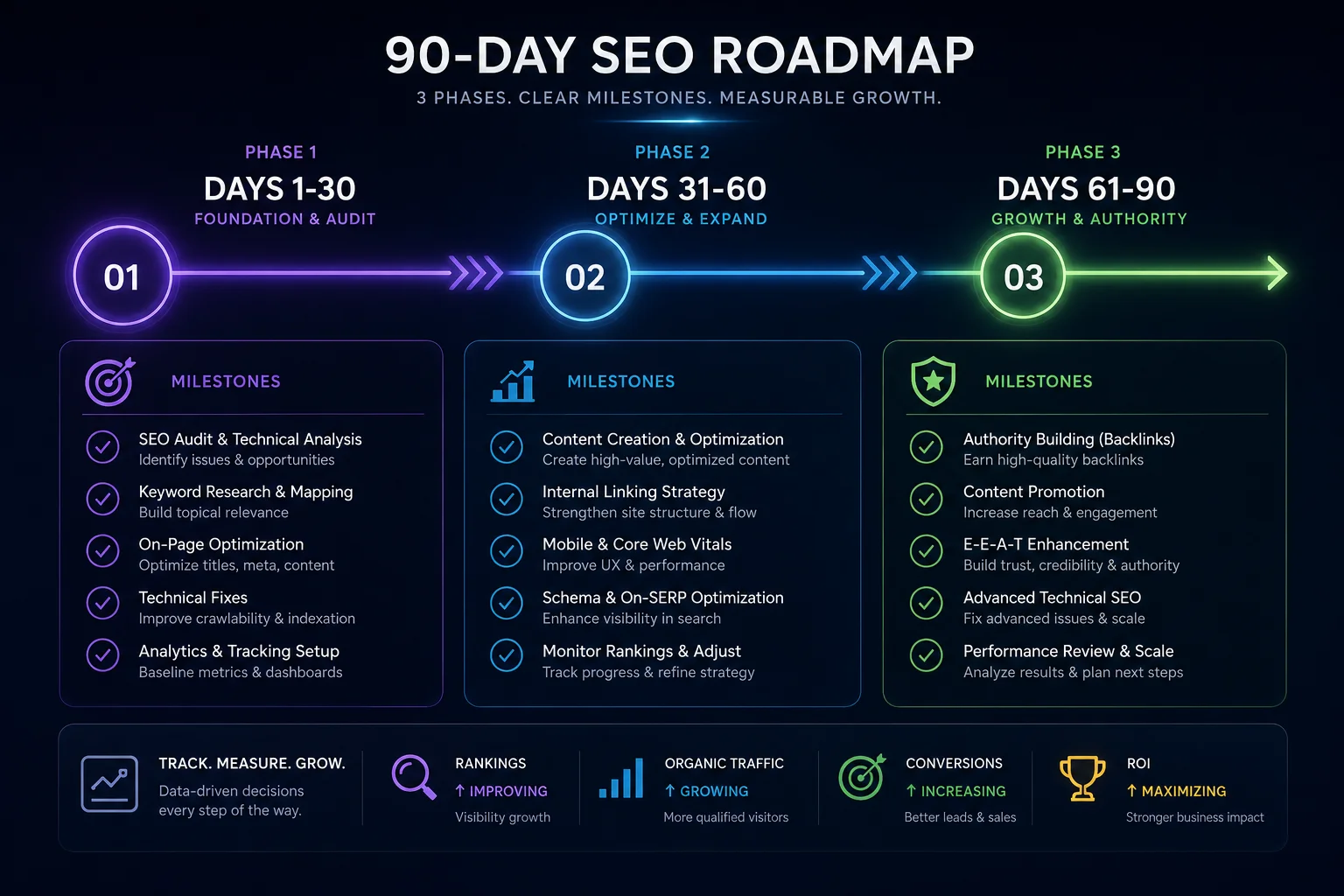
This guide breaks down the first 90 days into three phases. Each phase builds on the previous one. Skip a phase, and the next one takes longer to show results.
Phase 1: Foundation (Days 1-30)
Month 1 is about getting indexed and building your first authority signals. Nothing else matters until Google knows your site exists and has a reason to trust it.
Get Your First Backlink
Your priority on day one is getting a link from an already-indexed site. This tells Google to crawl your domain. Submit your project to WebProjectList - it takes 5 minutes and gives you a dofollow backlink from a high-DR directory. Create your listing before you do anything else.
Set Up Search Console
Verify your site in Google Search Console and submit your sitemap. This is how Google learns about your pages. Without it, Google may take weeks to discover your content organically.
Fix Technical SEO
New sites cannot afford technical issues. Address these before publishing anything:
- Page speed under 2.5 seconds on mobile (test with PageSpeed Insights)
- Mobile responsiveness - Google uses mobile-first indexing
- SSL certificate (HTTPS is non-negotiable)
- Clean URL structure with descriptive slugs
- No broken links or 404 errors
Start Keyword Research
You cannot compete for high-volume keywords. Target long-tail terms (3-5 words) with low competition. Question-based queries work well for new sites. Use keyword research tools and filter for Keyword Difficulty under 20. Identify 15-20 terms that are realistically winnable.
Phase 2: Content Engine (Days 31-60)
Month 2 is about building topical authority. Google ranks sites that demonstrate deep knowledge on a subject, not sites with random articles on different topics.
Build a Topic Cluster
Choose one core topic and build everything around it. Write one pillar page (2000-3000 words) that covers the topic comprehensively. Then write 10-15 cluster articles that each cover a subtopic, all linking back to the pillar page. This structure signals to Google that your site is an authority on that specific subject.
Add More Trust Signals
Beyond your WebProjectList backlink, build profiles on free platforms that provide dofollow links:
- Crunchbase (DR 91) - company profile
- GitHub (DR 97) - project repository
- LinkedIn Company Page (DR 98) - business profile
- Indie Hackers (DR 73) - founder profile
These are quick to set up and add diversity to your backlink profile. See our free backlink guide for the complete list.
Optimize On-Page SEO
Every page on your site needs these elements optimized:
| Element | Requirement |
|---|---|
| Title tag | Under 60 characters, includes target keyword |
| Meta description | Under 160 characters, compelling, includes keyword |
| URL slug | Short, keyword-rich, uses hyphens |
| Internal links | 3-5 per page to related content on your site |
| Readability | Short paragraphs, bullet points, clear headings |
Phase 3: Scale and Maintain (Days 61-90)
Month 3 is about consistency. The sites that win are not the ones with the best launch week. They are the ones that publish regularly for months.
Publish Weekly
One article per week is the minimum for a new site. Two is better. Each article should be at least 1000 words, address a specific search query, and link to at least 2 other pages on your site. The internal linking structure distributes whatever authority your new domain has across all your pages.
Request Indexing
After publishing each new page, use the URL Inspection tool in Google Search Console to request indexing. This speeds up the time between publishing and appearing in search results. Without this step, Google may take 2-4 weeks to discover new pages on a low-authority domain.
Build More Backlinks
Move beyond quick-win backlinks. Start publishing on Medium or Dev.to (one article per week linking back to your site). Engage in relevant communities. Answer questions on Stack Overflow or Quora where your expertise adds value.
Monitor and Adjust
Check Google Search Console weekly for:
- Which pages are getting impressions (write more on those topics)
- Which queries are driving clicks (optimize those pages further)
- Indexing errors (fix immediately)
- Pages with high impressions but low CTR (improve title and meta description)
Beyond 90 Days
After three months, you should have 15-20 published pages, a handful of quality backlinks, and the first signs of organic traffic. From here, the strategy is simple: keep publishing, keep building links, and keep monitoring your analytics.
Most new sites see meaningful traffic between months 3 and 6. The first 90 days are about building the foundation. The next 90 are about compounding. Every new article adds to your topical authority. Every new backlink strengthens your domain. The curve accelerates.
Start today. Submit your site to WebProjectList for your first backlink, set up Search Console, and publish your first piece of content this week. The rest follows from consistency.